- Product

- Pricing
- Affiliate Program
- Developers
- Resource
 EN
EN
MoreLogin is the world's first account management tool that supports both cloud phones and antidetect browsers. It focuses on fingerprint emulation technology, offering tools like the Synchronizer and providing industry-leading data security. Typically, websites generate digital fingerprints (User-Agent, Canvas, fonts, resolution, etc.) to track users. With the MoreLogin antidetect browser, each browser profile gets a unique fingerprint, reducing detection risk and maintaining online anonymity. Multi-account operation becomes simple, stable, efficient, and secure.
MoreLogin supports both Chrome and Firefox browser kernels and can simulate multiple operating systems including Windows, macOS, Android, and iOS. The free version includes 2 free forever antidetect browser profiles and 2 free team members, with no credit card required for registration. Paid plans start at just $9 per month, offering excellent value. Additionally, MoreLogin provides Cloud Phone functionality—virtual devices running on ARM chips in the cloud that perform like real devices and can be used for social media management, affiliate marketing, and gaming.
However, fingerprint isolation alone is not enough. If multiple accounts share the same IP address, platforms can still identify that these accounts belong to the same user through IP association. Therefore, "one account, one environment, one IP" is the industry-recognized best practice.
Thordata, as a global leading proxy service provider, offers over 60 million quality IPs from legitimate sources, covering 190+ countries and regions worldwide. With an average response time of less than 0.5 seconds and 99.9% uptime guarantee, Thordata's product line includes:
Residential Proxies: 60M+ secure and reliable IPs with rotating and sticky sessions, traffic-based pricing starting at $2.00/GB, ideal for high-anonymity scenarios
Mobile Proxies: Real 4G/5G/LTE mobile network proxies with automatic mobile IP rotation, starting at $5.00/GB, perfect for mobile data collection
Static ISP Proxies: Keep the same IP address with per-IP pricing and unlimited bandwidth, starting at $0.75/IP, suitable for long-term account operations
Thordata proxies support HTTP and HTTPS protocols, with precise geolocation capabilities down to country, state/province, city, and even ISP level. All plans operate on a pay-as-you-go basis with no minimum contracts, giving you full budget control.
First, visit the Thordata website to register an account. New users can request a 1GB free trial for residential proxies to thoroughly test proxy quality before making a purchase.
In the Thordata user dashboard, you can select the appropriate proxy type based on your business needs. Thordata offers a simple, self-service dashboard where you can view all proxy data usage and create and manage proxy users. After purchase, the proxy list page in the dashboard displays each proxy's IP address, port, username, password, country/region, and expiration date.
Thordata supports username/password authentication. The configuration format is as follows:
Proxy Type: HTTP or HTTPS
Proxy Host: [IP address or domain]
Port: [Port number]
Proxy Account: [Username]
Proxy Password: [Password]
Visit the MoreLogin website to download and install the client for your operating system (Windows or macOS). Register an account and log in to get started. MoreLogin supports multiple interface languages including English, Russian, Portuguese, Chinese, Vietnamese, Spanish, and Japanese.
Click the "+ New Profile" button in the right sidebar
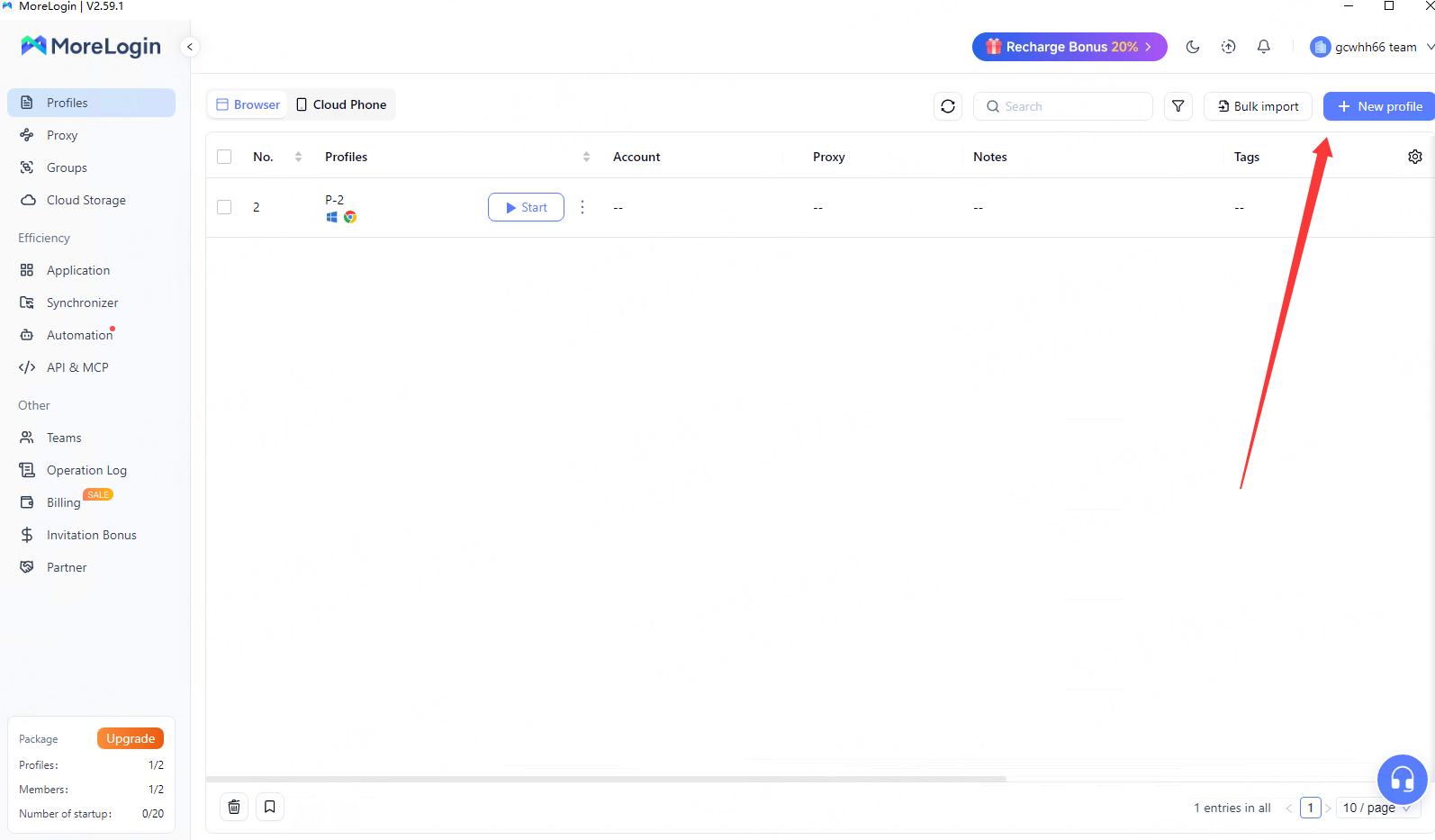
Select "Browser Profile" → "Advanced Create"
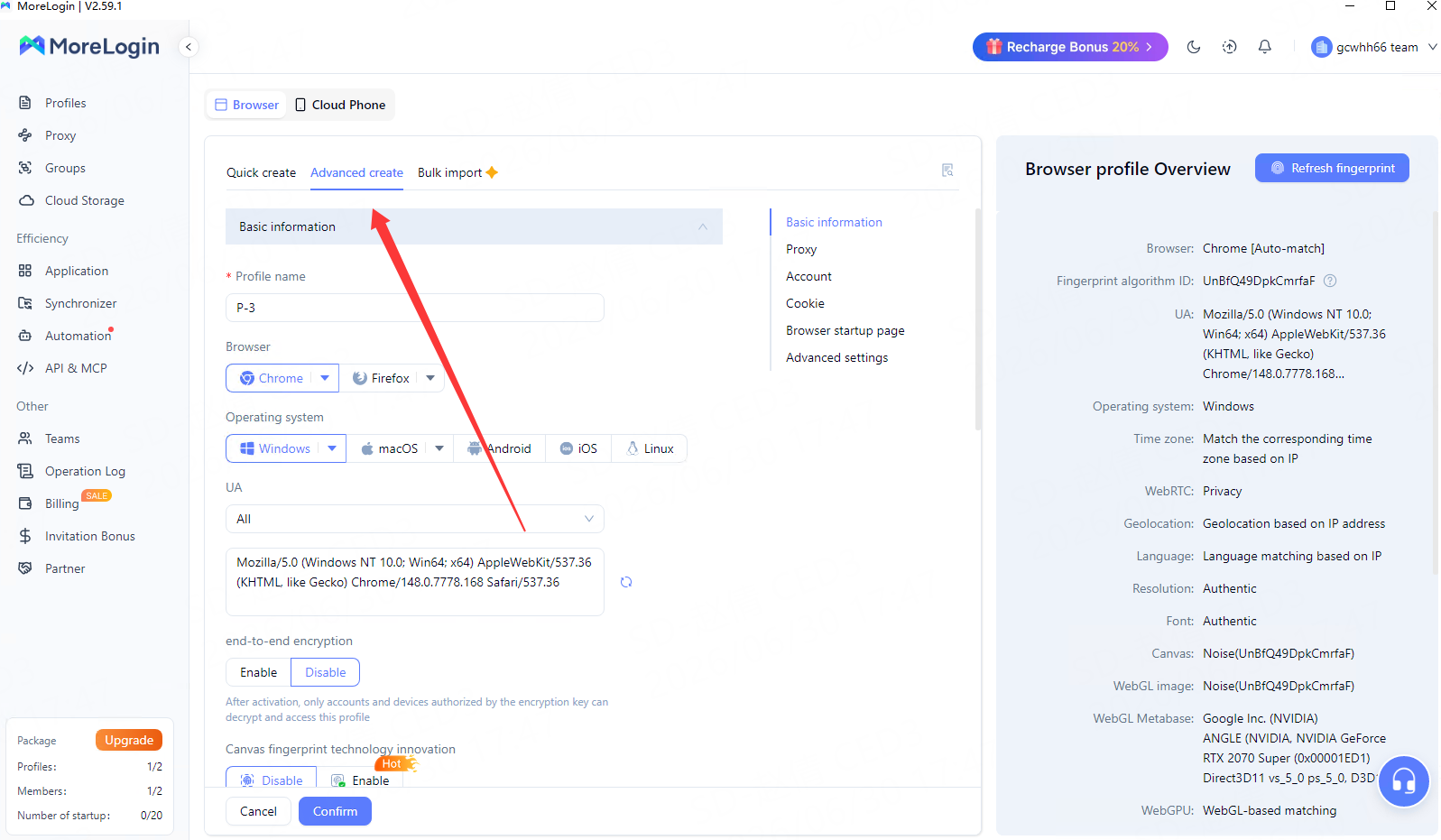
In the "Basic Information" section, configure the following parameters:
Profile Name: Enter a name for the profile (optional, for management purposes)
Select the desired browser type: Choose Chrome or Firefox
Select operating system: Choose based on your target audience (Windows, macOS, Android, iOS)
Select User Agent: Select the OS and browser version
End-to-End Encryption: Off by default; when enabled, only authorized accounts and devices can decrypt and access this profile
Canvas Fingerprinting Technology Innovation: Choose real canvas fingerprinting to enhance account security
Select a group: Choose a profile group
Select a tag: Add tags for organization
Account remarks: Optional notes for management
Navigate to the "Proxy settings" page—this is the critical step for integrating Thordata proxies. MoreLogin offers three proxy configuration options:
Option 1: No Proxy
The device will use the local network, and the IP will change according to the computer's network. Not recommended for multi-account operations.
Option 2: Configure Platform Proxy
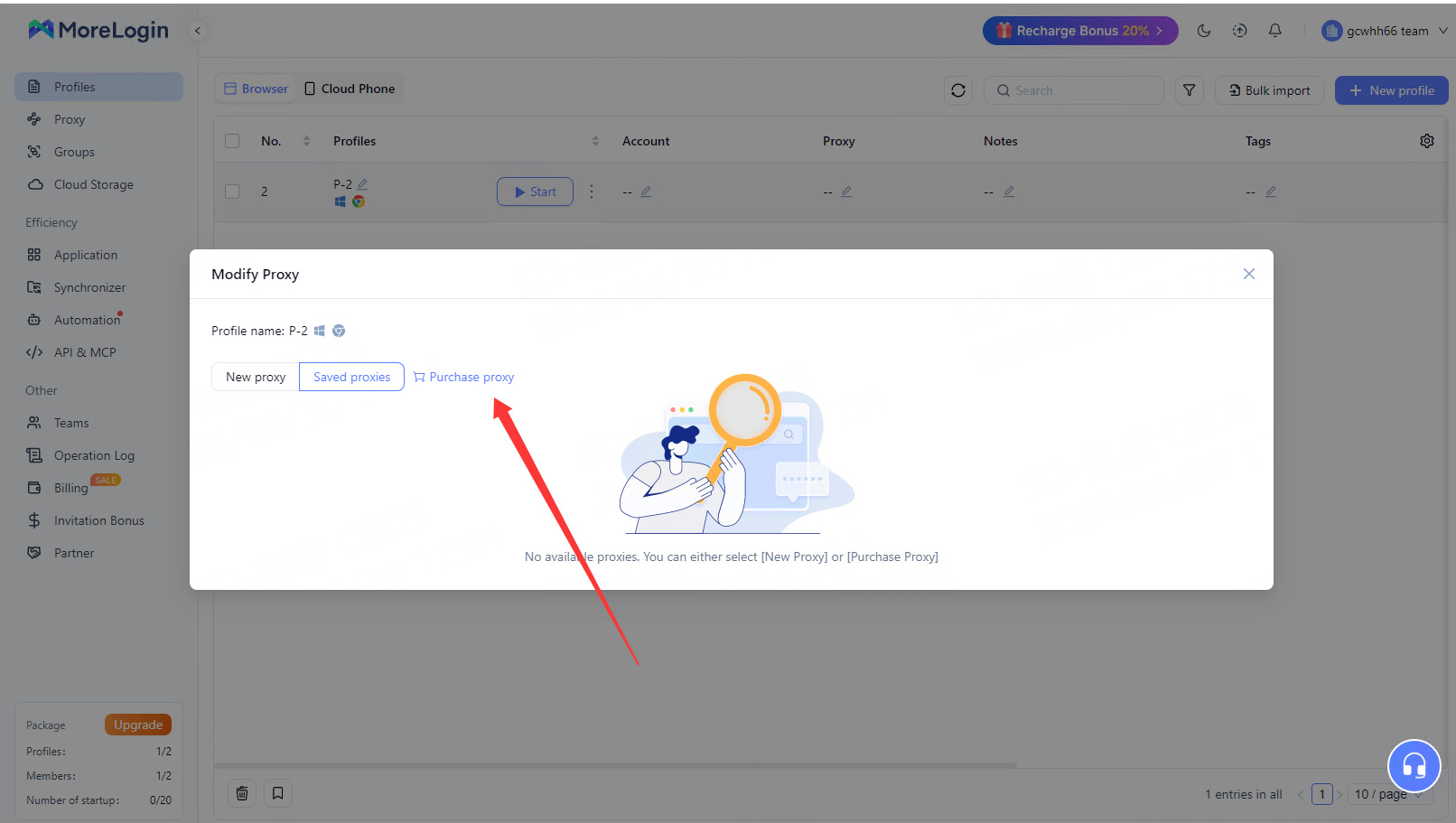
Select "Use saved proxies" and search for purchased proxies by name. MoreLogin only provides proxy services in certain countries. For greater flexibility, we recommend Option 3.
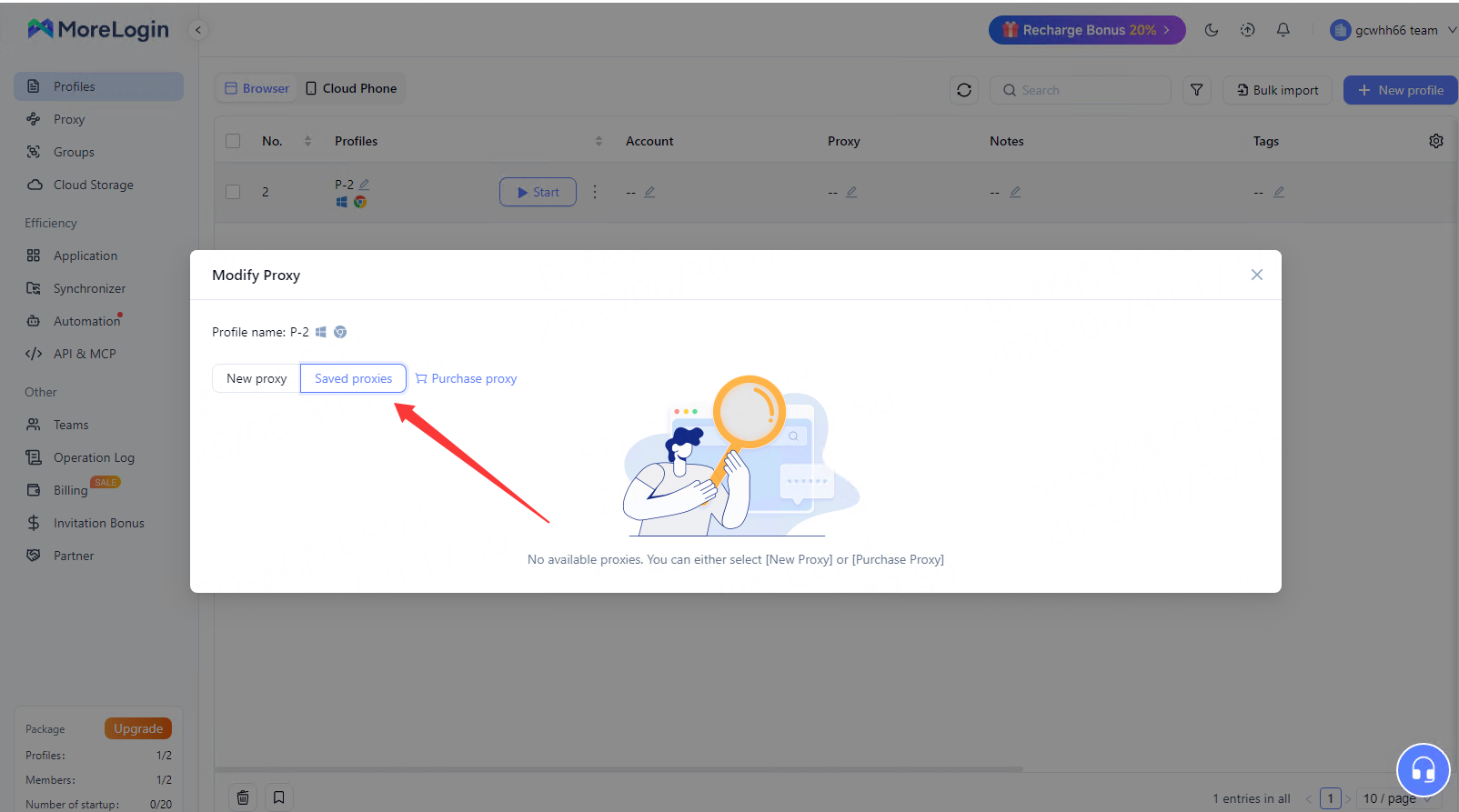
Option 3: Configure Self-Own Proxy
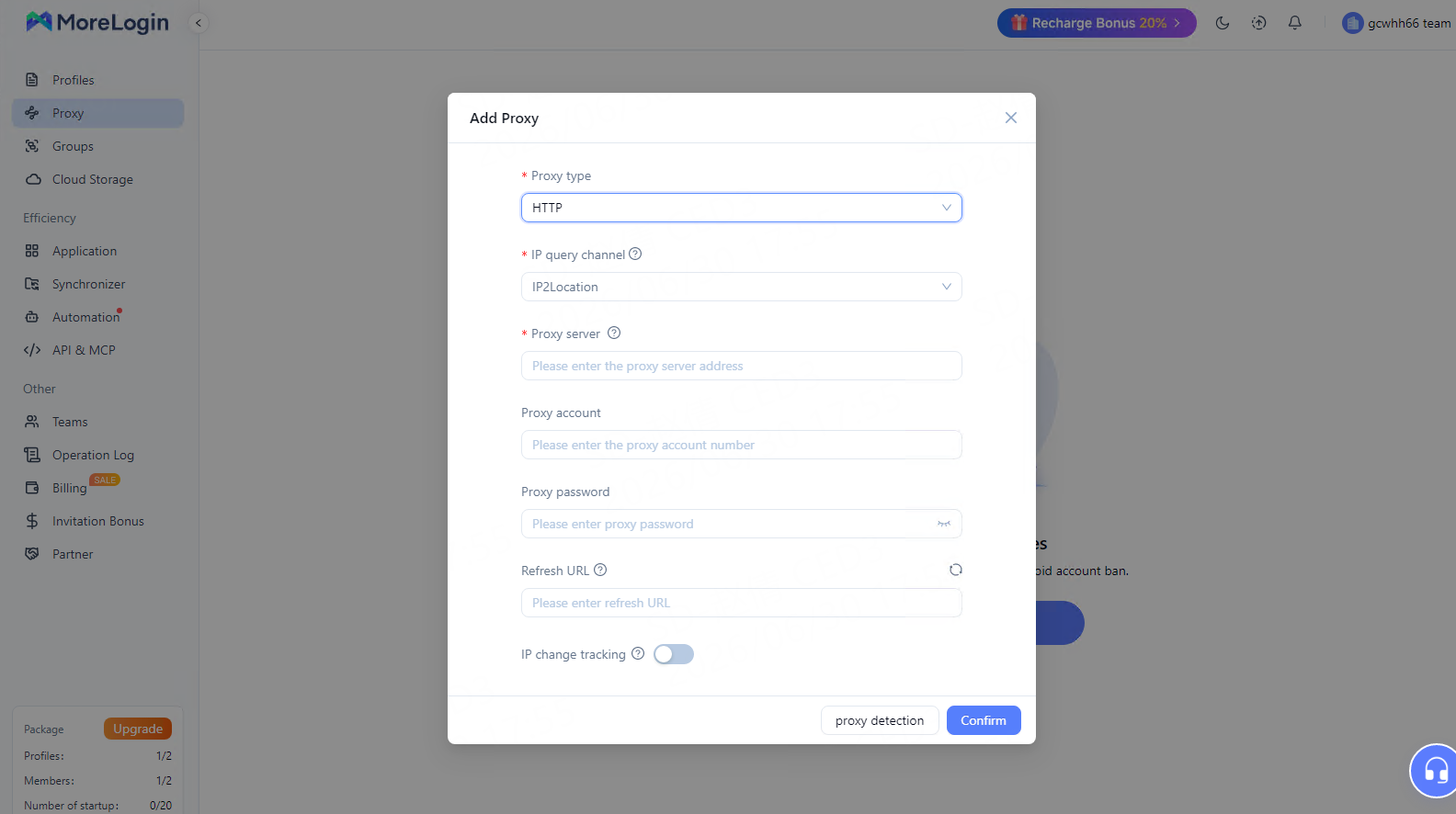
Select proxy type: Based on the protocol provided by Thordata, choose HTTP or HTTPS. For browser traffic, HTTP/HTTPS protocols are sufficient.
Fill in proxy information:
Proxy Host: Enter the IP address or domain provided by Thordata
Port: Enter the corresponding port number
Proxy Account: Enter your Thordata username
Proxy Password: Enter your Thordata password
Proxy detection: After filling in the details, click the "Proxy detection" button. MoreLogin will automatically test the proxy connection. If configured correctly, a success message will be displayed.
Advanced options:
For rotating proxies, you can set a Refresh URL
Configure proxy query channels to verify IP geolocation
In the "Account Settings" section:
Add an Account: Select the platform name for the account you want to add. If unavailable, choose "Customised Platforms"
Username Name and Password: Enter the login credentials
Enter 2FA Key: Supports manual key input or QR code upload
Password Protection: When enabled, only the super administrator can view the password and use the F12 developer tools
Cookie (optional): Supports importing cookies in JSON and Netscape formats. Currently, only the Twitter platform supports token import.
Browser Profile Startup Page: Choose which tabs to open and which page to stay on after starting the browser profile.
In "Advanced Settings," you can modify the browser fingerprint yourself, and MoreLogin provides default fingerprint options. The browser fingerprint summary can be viewed on the right side. We recommend enabling:
Timezone and Language: Match the proxy IP location to enhance environment authenticity
Geolocation: Set to be based on the IP address, allowing the system to automatically match the proxy location
Do Not Track: Enable for enhanced privacy protection
Click "Confirm" to save the configuration. Find the newly created profile in the profile list and click "Start". MoreLogin will open an independent browser window. The first tab will display the current IP address, geolocation, and browser fingerprint information, allowing you to verify that the configuration is working correctly.
If you need to manage a large number of accounts, configuring proxies one by one is inefficient. MoreLogin supports batch proxy addition:
Click "Proxy Service" in the left sidebar
Click the "Add proxy" button in the top right → "Batch add"
Paste the proxy list from Thordata in the following format:
proxyIP:port:username:password
Proxy type://Proxy host:Proxy port:Proxy account:Proxy password
Click "Proxy detection" for batch verification, then click "OK" when confirmed
MoreLogin supports setting different permissions for team members:
Super Administrator: Can modify/delete profiles, configure proxies, and view passwords
Regular Members: Permissions assigned by the administrator
This tiered permission design is perfect for cross-border e-commerce teams, social media marketing teams, and other multi-person collaboration scenarios. Passwords stored in the browser will not be exposed to team members during use.
The combination of MoreLogin fingerprint browser and Thordata proxy IPs provides a comprehensive isolation solution for digital operations—from browser fingerprint to network layer. With the detailed configuration guide in this article, you can quickly build secure, stable, and efficient multi-account operation environments.
Whether you're a cross-border e-commerce seller, social media marketer, data collection engineer, or ad verification specialist, this combination can significantly improve work efficiency and reduce account association risks. Thordata's rich resources, including the 1337x Proxy List, can also provide more options for your specific needs.
Visit the Thordata website to get proxy services today, and complete the configuration in MoreLogin to start your secure multi-account operation journey!
 EN
EN

.png)